Updated 25 November from Wild Dog’s 21 November v0.1.87.20965 note, 19 November v0.1.84.20900 update and 13 November announcement. The last has v0.1.79.20515 in its feed title and v0.1.79.20528 in its body. Game changes are developer-reported; comparisons and team routines are editorial suggestions.
Your first check
Use the in-shop Supply Terminal → Order Settings. Individual menu controls moved there on 19 November; on 21 November My Ramen orders only was added there and Noodle Firmness Requests moved there too. At least one My Ramen dish must be enabled for orders before limiting standard customers to those dishes.

Start at the Supply Terminal, not the old World Settings page
Order Settings becomes available from shop level 1 in the 19 November update. The patch moves individual side-dish and other menu choices out of World Settings. The 21 November update adds the My Ramen-only control to this section and moves firmness requests there. Older October instructions on this site pointed to World Settings; that path has been superseded for these controls. Difficulty, thief appearances and time settings are separate questions.
Registered is not the same as enabled for orders
The current condition is at least one My Ramen dish enabled for orders. First identify the registered dish, then confirm it is enabled in the order pool, then inspect My Ramen orders only. A saved recipe with no enabled custom dishes does not satisfy the wording of the new condition. The restriction is described for standard customers; do not extend it to every critic challenge.
Read the official screen in three passes
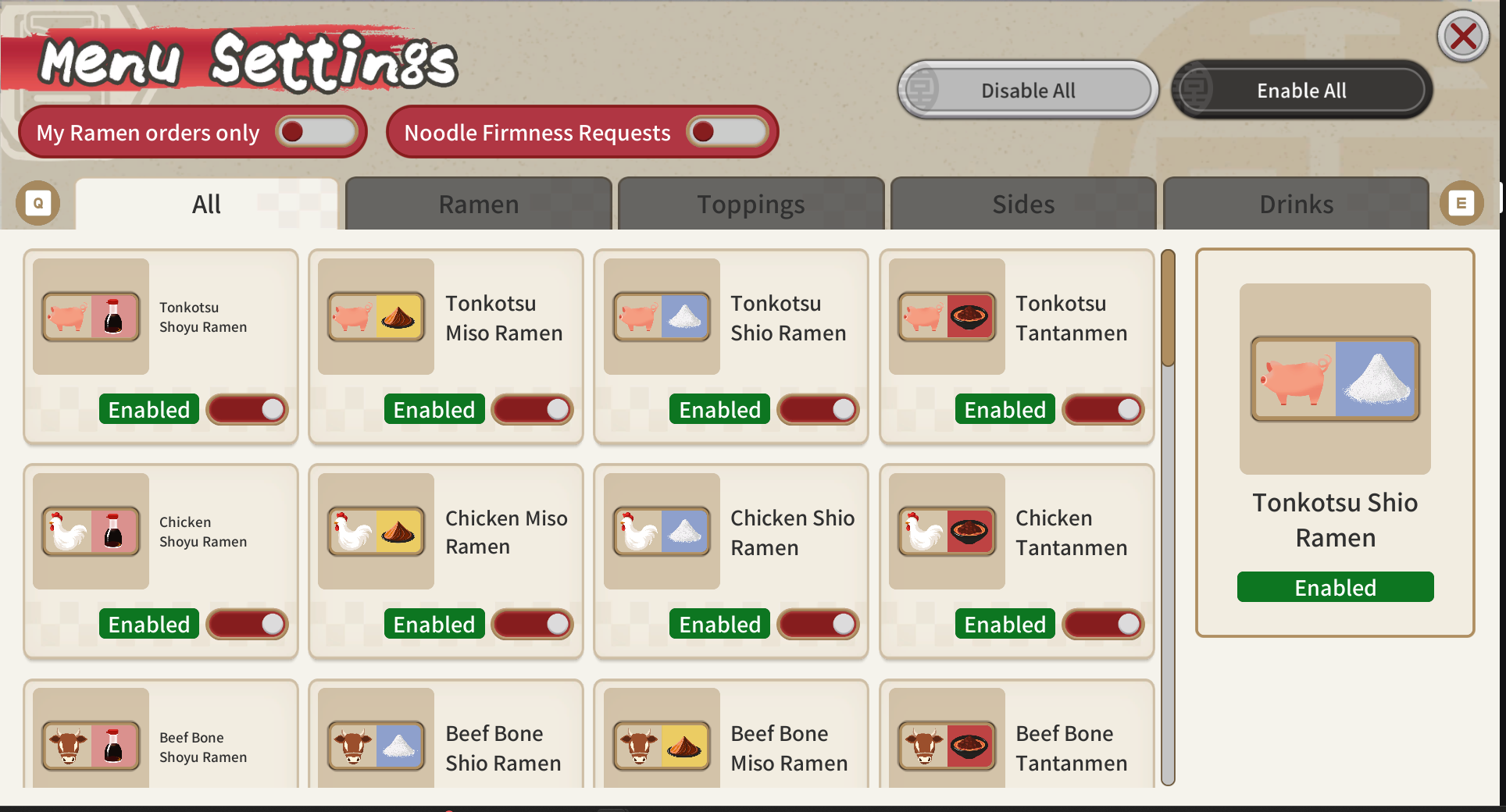
The screenshot is headed Menu Settings, while the patch calls this section Order Settings. First find the two global controls across the top. Then inspect the dish category and individual enabled cards. Finally read the selected dish at the side. The image is a reference to the developer’s screen, not a screenshot of your saved choices, and a visible toggle is not proof of its state in your own shop.
Plan a two-person service before enabling everything
Choose the ramen recipes the team can prepare, then name who owns each enabled side and drink. If Karaage remains on the menu, include oil, plates and the final meal check. Record the initial choices before a trial so the next session can restore them. This is an editorial workload plan; the sources do not establish that a narrow menu earns more.
Keep outstanding orders separate from future choices
A menu toggle governs what customers can order; the notes do not establish that it cancels a ticket already issued. Keep fulfilling the request visible on the current ticket. Likewise, enabling six recipe slots does not mean all six are enabled for orders. Recipe storage, order eligibility and a finished meal are three separate states.
Keep a useful comparison
Use this sheet while you check the problem. Tick a row when you have recorded an observation, even if its outcome is still unresolved. Downloading creates a local text snapshot; it does not save your game or send a report.
| Check | What to record | Interpretation |
|---|---|---|
| Location | Supply Terminal → Order Settings | Current menu-control home |
| Recipe eligibility | At least one My Ramen dish enabled | Registration alone is not the complete stated condition |
| Open ticket | Actual request already received | No automatic cancellation is established |
Watch the game in motion
These videos provide context for the kitchen and shop. Their presence does not verify the checks above. The cover images are credited game previews, not extracted video thumbnails.
GameTrailers / Wild Dog trailer · Source listing ↗
Official announcement preview. Use it to see the game in motion; it is not a walkthrough of this troubleshooting procedure.
Watch on YouTube ↗Miuneru / VOMS Project · Source listing ↗
Creator-listed Japanese gameplay session dated 14 October. Recorded before the 15 October update; background viewing, not proof of the new features.
Watch on YouTube ↗YouTube loads only when you press the play button. It can then receive your network and device information. Video privacy.
Questions before you retry
Where did side and drink controls go?
To Order Settings on the Supply Terminal in the 19 November update.
Where is Noodle Firmness Requests?
In that same section since 21 November.
Does My Ramen-only affect critics?
The new note describes standard customers. We do not extend it to critic challenges.
Sources and update scope
15 October update v0.1.57.18549 ↗. Source reviewed 25 November 2026. An earlier official news check on 15 October returned v0.1.57.18549. For subsequent changes, compare the current patch reference. Patch notes are developer reports; community reports are player observations. Checklists and diagrams are our editorial suggestions.
This page has no release-build playtest, measured recipe or guaranteed workaround. Update it when Wild Dog changes the relevant mechanic or a reproducible report supplies better evidence. Send a correction with the source and version.